Outline of an example microservice
In this example, we are going to create a microservice called carInsurancePricer: a simplified version of an online service that prices car insurance against given inputs.
A screenshot of this completed microservice is seen below. The important basic elements are labelled in red.
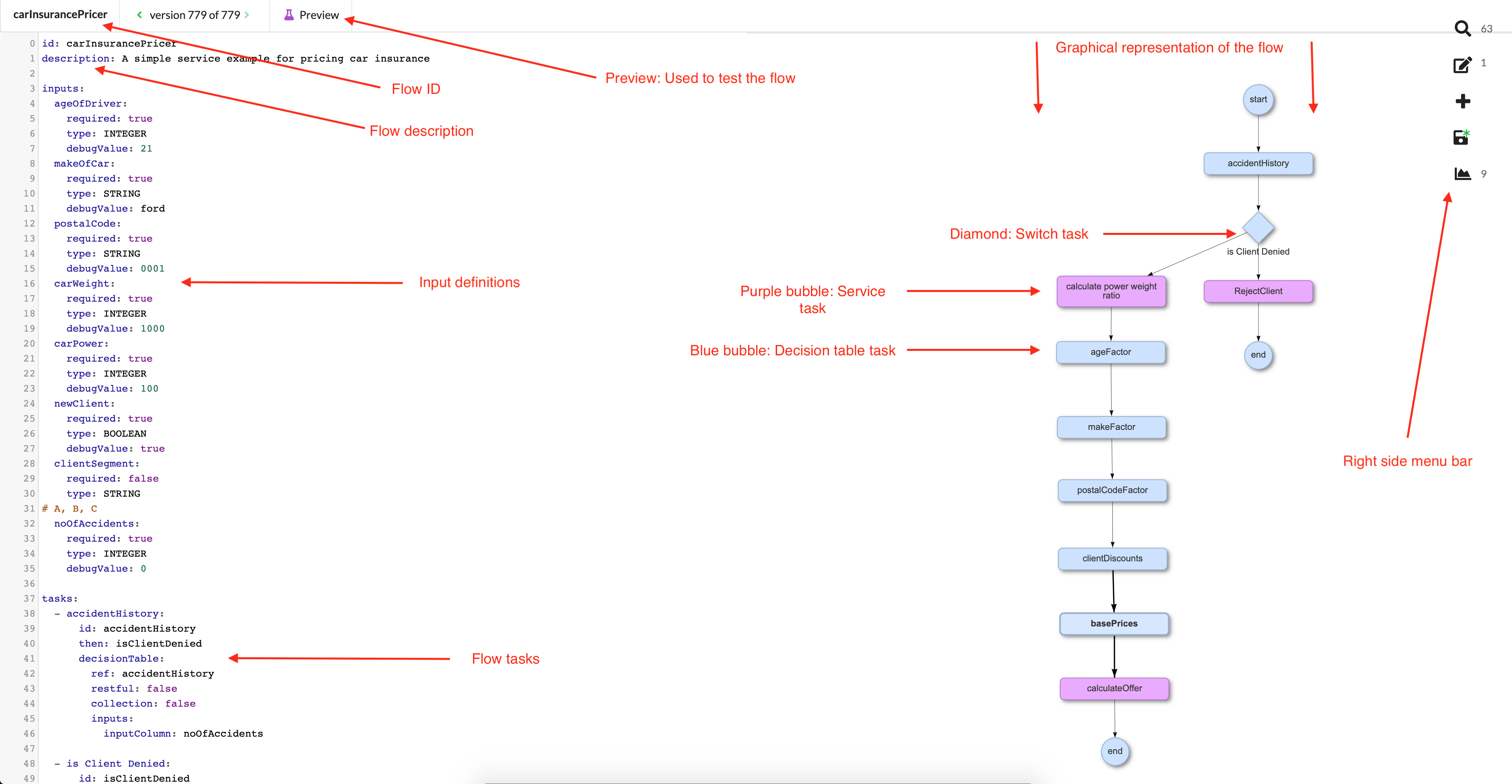
Our carInsurancePricer example microservice consists of the following inputs:
- ageOfDriver
- makeOfCar (Make of the car, not including the year)
- carPower
- carWeight
- postalCode (Zip code of driver's residential address)
- newClient (This handles whether the request is an existing or a new client, meaning a client for whom we don’t have any history data)
- clientSegment (Client segment ID which is created for an existing client. Client base segmentation is used widely in any b2c industry to improve customer service. In this scenario, client segment ID only exists for existing clients.)
- noOfAccidents (The number of accidents pulled from a client's driving history within the past 12 months. If this number is too high, insurance products cannot be offered, and the flow terminates)
It consists of these decision tables:
- ageFactor
- makeFactor
- postalCodeFactor
- clientDiscounts
- basePrices
- accidentHistory
Finally, it consists of these flow tasks:
- calculateOffer (service task)
- calculatePowerWeightRatio (service task)
- isClientDenied (switch task)
Summary outline of the steps to take to create this microservice
Although the example carInsurancePricer service lacks many details, it still provides an easily-extendable baseline. Using this walkthrough as an example, longer and more complex flows can be created on a larger scale simply by applying the same techniques, strategies, and principles you will see in this basic example.
To create a flow from the ground up, there are several steps you need to take:
Step 1: Create a flow asset
Step 2: Create inputs
Step 3: Create tasks
- Create the first decision table task and accompanying decision table and test
- Create the first service task and test
Step 4: Repeat Step 3 until flow is complete
The following pages will take you through, step-by-step, recreating this example microservice.