Introduction to Asset Elements
What's on this page?
Introduction to the Wrench Assets
Flow
Decision Table
Data Types
Flow task
Tag
Introduction to the Wrench Assets
The Wrench utilises four different types of assets: Flows, Flow Tasks, Decision Tables, and Tags. In general terms, the flow is the system within which the other assets live. The flow defines the sequence of events to come. Flow tasks are actions within a flow: the steps themselves that will be taken. Decision tables accept inputs and calculate outputs, which determine the final outcome of the flow and whose order of execution are organised by the flow tasks. These elements together comprise a flow.
A tag is the fourth asset, and it is simply a numbered version which preserves a history of changes that a user has made to a flow or decision table.
This page will give a brief and general overview of these assets. For more detailed and specific information on assets, see Working with the wrench
Flow
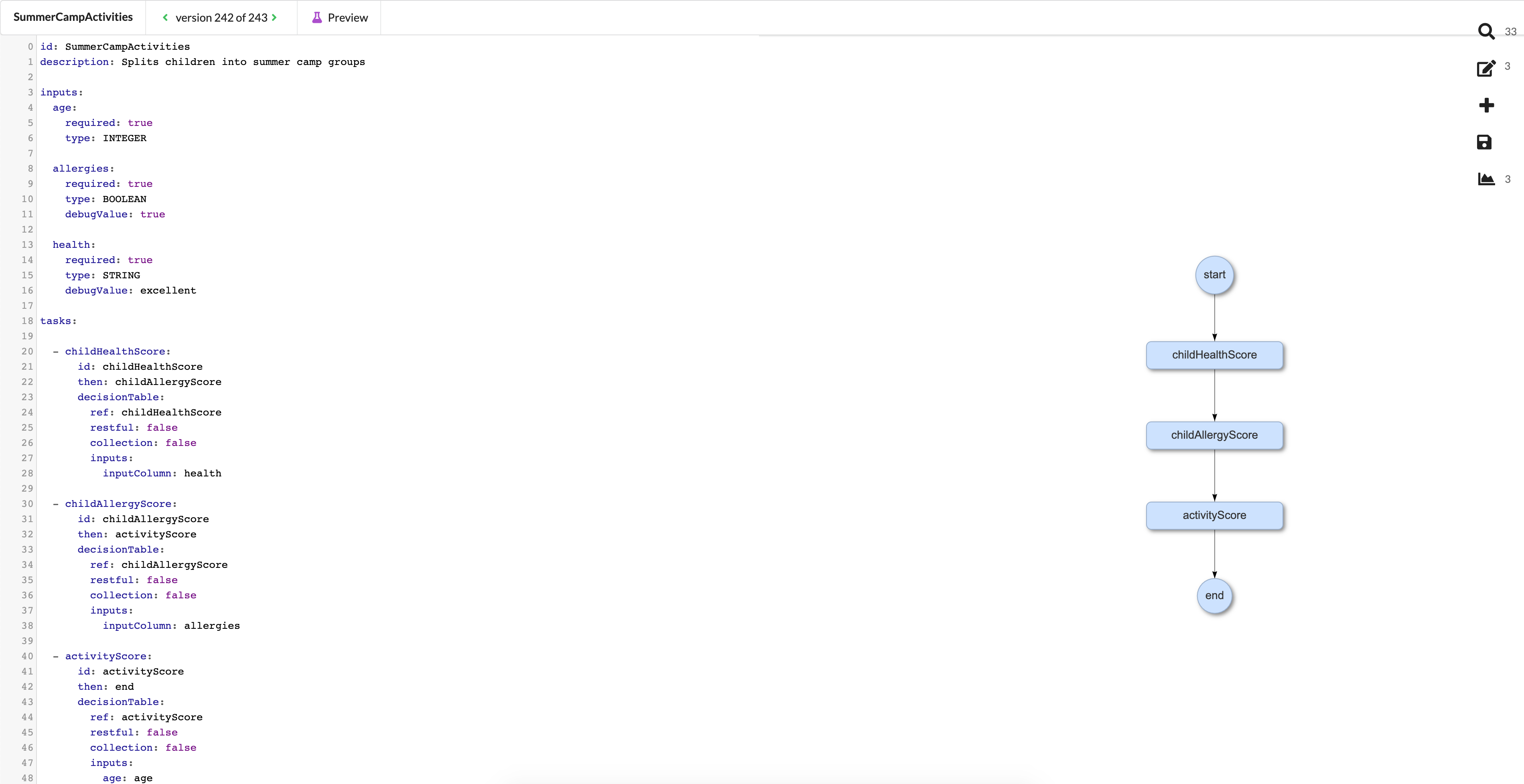
A flow is the root of everything in the Wrench. In general, the flow is the asset which defines the sequence of events and processes that are to take place. It is visually represented as a series of interconnected bubbles and arrows indicating the direction of the processes. It can be manipulated via simple code editing to perform operations such as creating, naming, and assigning inputs, creating Flow Tasks and Decision Tables, and managing the overall sequence of events within itself.
This is an example flow editor snapshot. On the left side of the screen is the code that you can edit to work with your flow, and on the right side is a graphical representation of the flow itself. The bubbles represent decision tables and the order in which they will be executed.
Decision Table
A Decision Table (DT) takes inputs and produce outputs. These inputs and outputs can be of several different Data Types.
Data Types
- DATE: Numeric input following the pattern of dd.mm.yyyy
- DECIMAL: Follows Java specification for BigDecimal. See Java specification for BigDecimal
- STRING: Text, numbers, symbols
- DATE_TYPE: Numeric input following the pattern of dd.mm.yyyy, –:–
- BOOLEAN: True or false
- LONG: Follows Java specification for Long. See Java specification for Long
- INTEGER: Numeric value without decimal points
This is an example Decision Table to assign a numerical score to a child based on whether he/she has allergies. This DT takes an input of type BOOLEAN (allergies: TRUE or FALSE) and produces an output of type INTEGER (Score based on whether allergies are present).

Flow task
Flow tasks are actions taking place within the flow itself. They are functions which take an input and output definition, execute a formula on these definitions, and produce an output which is the product of this formula. Flow tasks can also be an integration to a third party service; for example, one can create a task in Jira and return the ID of that task.
There are two basic types of flow tasks: Decision table tasks and Service tasks.
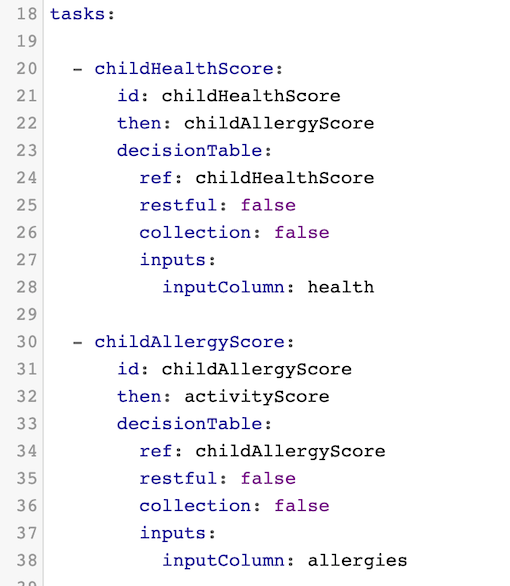
Flow tasks can be found within the flow itself under the tasks keyword.
This is an example decision table flow task taken from the previous screenshot of a flow.
Tag
A tag is an immutable snapshot of a set of Wrench assets at a given point in time. Using tags, all previous versions / changes to a set of assets can be viewed.
The current version tag can be seen at the top of the flow editor screen.